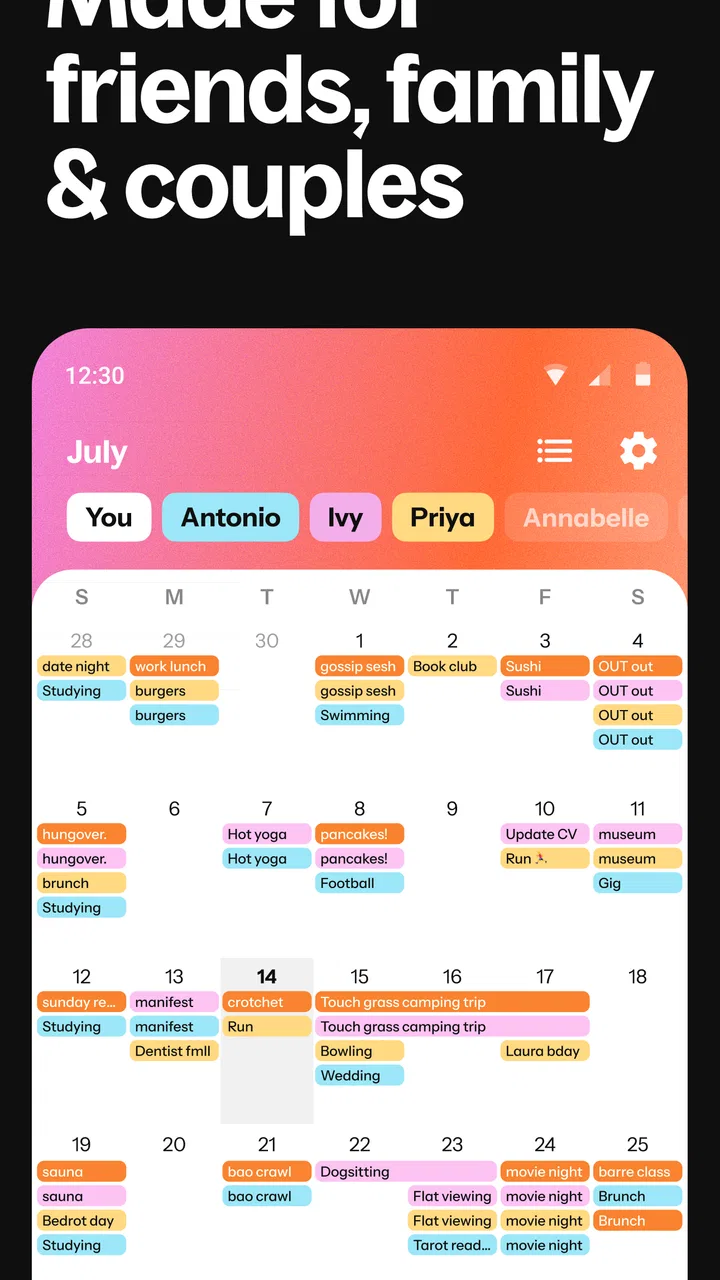
Howbout: shared calendar
- 4.6
- Rating
- 1.00M
- Installs
- Free
- Price

 Analysis by App-foxy
Getting a group of people to agree on a time sounds easy until everyone starts checking a different calendar, sending screenshots, and replying with “I might be free.” I tried Howbout as a social planning app built around that exact problem. Its main idea is simple: friends and groups can share availability, arrange events, chat about them, and keep plans in one place instead of scattering them across messages.
That focus makes it different from a personal calendar. I would not choose it because I need a complete work organiser or a replacement for every scheduling tool I already use. I would choose it when the real challenge is coordinating people who have busy, changing lives and do not want to expose every private appointment on their calendar.
How I decide whether Howbout is the right planning tool
My first test for any shared calendar app is not how attractive the interface looks. It is whether the app reduces the number of messages needed to make a plan. If I still have to ask each person separately, interpret vague replies, and manually copy the final arrangement into another calendar, the app has not solved much.
You May Also Like

 Blood Strike: 2.5 Anniversary
Blood Strike’s Loadouts Turn Every Drop Into a Tactical Gamble
A close look at Blood Strike’s custom loadouts: how fast access to signature weapons reshapes its battle royale rhythm, rewards preparation, and narrows the gap between fights.

 Pandora - Music & Podcasts
Pandora’s Music Is Easy to Start, but Harder to Recover
Pandora’s strength is its low-effort path from a seed to a station. Its weak spot is how much confidence it asks you to place in connection, setup, and quiet recovery.

 8 Ball Pool
 Is Built on Rivalries, Rematches, and Routine
A close look at the rivalries, rematches, shared routines, and unanswered safety questions that turn a quick pool match into a persistent mobile community.

 Samsung Music
’s Quiet Strength Is Playing What You Already Own
Its reach comes less from spectacle than from dependable access to a personal library. That simplicity is both the app’s strongest retention engine and its ceiling.

 AccuWeather: Weather Radar
AccuWeather Review: A Quick, Clear Forecast for Everyday Decisions
For everyday plans, the best forecast is the one you can understand quickly. AccuWeather makes rain timing, radar, and local conditions easy to act on, with a few trade-offs.

 Hill Climb Racing
Why Hill Climb Racing Still Turns Crashes Into One More Run
A tiny car, a bumpy hill and one more upgrade: Hill Climb Racing keeps resurfacing because its simple chaos makes every near-miss feel personal.
More From Our News Desk
View All News


With Howbout, I look at four practical questions. Can my group see enough availability to find a workable time? Can we discuss the plan without losing the conversation? Can an event remain understandable after several changes? And will people who are less organised actually use it, rather than treating it as another notification they can ignore?
The app is free to download and use, with optional in-app purchases ranging from a few dollars to several dozen dollars per item. That makes it easy to test with a group before asking everyone to commit. It is aimed at everyone rather than a specialist audience, and the developer is Howbout. On Android, it supports version 8.0 and later, while the current version is 15.1.0.
Its public reception is encouraging: it holds a 4.6 average from around eighteen thousand ratings, has more than a million installs, and has been available since late 2019. I treat those figures as a sign that the basic idea has found an audience, not as proof that it will suit every group. Shared planning only works when the people invited are willing to participate.
The first setup decision: how much of your schedule to share
The most important choice is deciding what “availability” means for your group. I would not begin by treating the app as a complete view of my private life. For a casual group, it is more comfortable to share open and busy periods or to mark useful blocks manually, rather than adding unnecessary personal detail to a social space.
This matters because different groups need different levels of precision. A group of friends arranging dinner may only need a few possible evenings. A sports team, study group, or family organising a trip may need a more reliable view of recurring commitments. Starting with the smallest amount of information that can solve the scheduling problem makes people more likely to join and keep using it.
I would also agree on a naming habit before creating lots of events. “Weekend plans” is easy to understand when it is new, but less helpful after several changes. A label such as “Saturday hike” or “birthday dinner” gives the conversation and calendar a shared reference point. This is a small discipline, but it prevents the app from becoming another stream of ambiguous notifications.
Where the shared approach works especially well
Howbout is strongest when the group already has a reason to coordinate regularly. A circle of friends who meets every few weeks can use it as a common planning space instead of restarting the same availability conversation each time. Roommates can use it for shared social plans. Families can keep an event visible to the people who need it without turning every message into a scheduling poll.
A realistic example is a group of five friends trying to arrange a day trip. One person works irregular hours, another has childcare responsibilities, and the others have commitments spread across the weekend. In a normal chat, everyone may suggest a different day, then revise their answer after checking another obligation. In Howbout, the group can compare suitable periods, discuss travel details in the event conversation, and keep the final decision attached to the plan.
The useful part is not merely seeing a calendar. It is the combination of availability and discussion. A time can look free but still be impractical because of travel, cost, or another responsibility. Keeping those explanations close to the event helps the group make a better decision than a bare “yes” or “no” poll.
Another less obvious use is deciding when not to plan. If a group can see that only one person is available for a proposed activity, it becomes easier to postpone rather than force an arrangement that will probably fall apart. That can save more time than finding a date quickly and changing it later.
How I would organise groups to avoid calendar clutter
I would separate groups by purpose instead of putting every contact into one large social calendar. A close-friends group, a family group, and a recurring hobby group have different expectations about what belongs in the shared space. Keeping them distinct makes invitations easier to understand and reduces the chance that a minor plan becomes visible to people who do not need it.
I would also create the event only after the basic idea is clear. For example, I would first discuss whether the group wants a meal, a film, or a day out, then use the shared planning flow to settle the time. This avoids filling the calendar with abandoned placeholders. Once the group has agreed, the event becomes the durable record rather than another speculative message.
For recurring groups, the app can be more useful when members update their availability before the organiser asks. That changes the workflow from “Who is free?” to “Which of these workable options suits everyone?” It is a subtle difference, but it makes the organiser less dependent on chasing replies.
What I like about keeping chat beside the event
Many scheduling tools are good at finding a time but weak at preserving the context around it. Howbout’s social emphasis is valuable because the practical details of a plan often change after the time is chosen. People may need to decide where to meet, who is bringing something, or whether the activity should move to another day.
I like the idea of having those messages attached to the relevant plan rather than buried in a general conversation. It gives the event a useful memory. When I return to it later, I can understand why the time was chosen and what still needs attention.
There is a trade-off, though. A chat-based planning space can become noisy if every small thought is posted as a new update. I would encourage a group to use the event conversation for decisions and important logistics, while leaving casual discussion in the usual chat if it does not affect the plan. Otherwise, the feature meant to add clarity can create another place to search.
Where a normal calendar may still be better
If my priority were detailed personal time management, I would probably stay with a traditional calendar. Personal calendar apps are generally better suited to appointments, reminders, work blocks, recurring obligations, and long-term organisation. Howbout feels more naturally social: its value appears when several people need to coordinate, not when one person wants a private productivity system.
I would also think carefully before using it for a workplace that needs formal scheduling, permission levels, or a strict record of responsibilities. The app’s friendly group approach is appealing for friends and informal communities, but a professional team may need tools designed around project ownership, availability rules, and administrative control.
For a one-time choice between a few dates, a simple poll can be faster. If everyone is already in the same messaging service and the decision is uncomplicated, asking for reactions may involve less setup. Howbout becomes more worthwhile when the group has repeated plans, changing availability, or enough detail that a poll would be forgotten once the decision is made.
When a messaging app is the more practical alternative
There is a real convenience advantage to using the chat app a group already checks every day. No new planning habit is needed, and nobody has to remember where the conversation lives. For spontaneous arrangements such as meeting for coffee in an hour, a direct message may be all that is necessary.
The weakness of that approach appears later. Messages are chronological rather than structured, so the final time can be hard to find after people suggest alternatives. A shared calendar gives the plan a stable location. I see Howbout as a better fit when the group repeatedly loses decisions in chat, not as a reason to abandon chat entirely.
Privacy, participation, and the social cost of switching
The biggest practical concern is not technical; it is social. Every member must understand what they are expected to share and how often they should update it. If only the organiser maintains the information, the group gets an incomplete picture and the app starts to feel like extra administration.
I would introduce it with one low-pressure plan rather than asking everyone to rebuild their entire schedule. Invite the people who genuinely need to coordinate, explain what information is useful, and let the group see whether the process saves effort. This approach also answers a common concern: people do not have to turn a casual social app into a detailed diary just to test it.
There can still be friction when people have different habits. One person may update availability carefully, while another responds only when directly asked. The app can make a group’s information easier to view, but it cannot make an unresponsive member reliable. For groups with a persistent participation problem, a simpler organiser-led method may be less frustrating.
I would also avoid assuming that every event needs everyone’s full schedule. Sharing only the relevant windows is a better social compromise for many groups. It reduces oversharing and keeps the planning task focused on the actual decision.
What the free model means for trying it with friends
Because the app is free, the sensible approach is to test it before considering any optional purchase. I would not ask a whole group to pay simply to discover whether they like the workflow. First, create one group, plan one real event, and see whether the app replaces enough back-and-forth to deserve a permanent place in everyone’s routine.
The in-app purchase range means some capabilities may involve spending, so I would pay attention to what the group actually needs rather than assuming an upgrade is necessary. A small group with occasional plans may get enough value from the basic experience. A group that coordinates frequently can judge the cost against the time saved, but only after experiencing the ordinary workflow.
The cost of switching is mostly the effort of changing habits. People need to accept invitations, open the shared space, and keep their availability useful. If the group already has a well-established system that nobody finds confusing, moving may create more work than it removes. If plans regularly disappear in chat, the transition is easier to justify.
Everyday strengths that are easy to overlook
One strength is that the app treats availability as a group problem rather than an individual reminder problem. That changes the organiser’s role. Instead of proposing a date and waiting for objections, the organiser can begin with the periods that have a realistic chance of working.
A second strength is the connection between planning and conversation. When a plan changes, the reason can stay near the event instead of being separated across several private messages. This is particularly useful for arrangements with multiple decisions, such as meeting location, transport, and timing.
A third strength is that it can support a more considerate planning culture. A group that sees conflicting schedules is less likely to interpret every declined invitation personally. The calendar makes the constraint visible without requiring someone to explain their entire life in the chat.
There is also a useful trade-off in the app’s social simplicity. It may feel more approachable than a formal team scheduler, but that same simplicity means I would not expect it to replace a robust professional calendar or project-management system. Its best role is the shared layer between personal schedules and informal group life.
Who should use it, and who should skip it
I would recommend Howbout to friend groups that arrange plans often, families trying to coordinate across changing routines, and informal clubs that need more than a one-off poll. It is especially promising for people who are tired of asking the same “when is everyone free?” question and then losing the answer in a busy chat.
I would be more cautious if I were the only person in the group who likes structured planning. The app cannot compensate for members who refuse to update availability or respond to invitations. I would also skip it as my main tool if I needed a detailed private work calendar, formal team administration, or a highly controlled scheduling process.
The age rating of Everyone makes the app approachable for a broad audience, but that does not remove the need for sensible group boundaries. I would still invite only the people who belong in each planning space and keep shared information limited to what the event requires.
My recommendation after weighing the alternatives
Howbout is worth trying when coordination, not calendar storage, is your real problem. I like it because it gives groups a place to compare availability, discuss the practical details, and preserve the final plan. That is more durable than a stream of chat messages and more social than a purely personal calendar.
I would begin with one upcoming event and a small group. If the app helps you reach a decision with fewer reminders and makes the finished plan easier to revisit, keep using it for recurring arrangements. If your plans are spontaneous, your group already communicates clearly in another app, or you need formal workplace scheduling, a simpler poll, messaging app, or professional calendar may be the better choice.
My final view is positive but specific: Howbout is not a universal replacement for every calendar. It is a focused social planning tool, and that focus is its advantage. Used by a group willing to share just enough availability and keep event discussions organised, it can turn the most tedious part of making plans into a much calmer process.
FAQs for Howbout: shared calendar
01What is Howbout and what makes it unique compared to other calendar apps?
Howbout is a shared calendar app designed to simplify planning and scheduling with friends, family, and groups. Unlike standard calendar apps, Howbout focuses on collaboration, allowing users to create events, share availability, and communicate seamlessly in one place. Its intuitive interface and social features make it a standout choice for those seeking a fun and efficient way to organize group activities.
02Can Howbout integrate with other calendar applications?
Yes, Howbout can integrate with existing calendar applications such as Google Calendar and Outlook. This integration ensures that users can keep all their appointments in sync, reducing the risk of double-booking and missed events. By connecting Howbout with your current calendars, you maintain an up-to-date schedule across all platforms.
03Is Howbout free to use, and are there any in-app purchases?
Howbout offers a free version with a wide range of features suitable for most users. However, there are optional in-app purchases available that provide enhanced functionalities, such as premium themes and advanced scheduling tools. These purchases are designed to enrich the user experience but are not required for the app’s core functionality.
04How does Howbout ensure the privacy and security of my data?
Howbout prioritizes user privacy and data security. It employs robust encryption methods to protect personal information and event details. Users have control over who can see their shared events and availability. The app complies with data protection regulations, offering a secure experience while managing your schedules and sharing them with trusted contacts.
05What devices are compatible with Howbout, and is it available on both Android and iOS?
Howbout is available for download on both Android and iOS devices, ensuring broad accessibility for users on different platforms. The app is optimized for smartphones and tablets, providing a seamless experience regardless of the device. Regular updates ensure compatibility with the latest operating systems, enhancing functionality and user experience.
Pros
- User-friendly interface for easy navigation.
- Real-time updates for seamless coordination.
- Integrated chat for instant communication.
- Customizable event reminders.
- Syncs across multiple devices smoothly.
Cons
- Limited customization for event categories.
- Occasional sync delays with external calendars.
- Requires internet for full functionality.
- Ads may interrupt free version users.
- Some features locked behind subscription.

Howbout: shared calendar
Gallery